Adopt and Raise a Baby Getting Started in Adopt and Raise
From Avatar Editor to your first house, beach trip, and family plan.
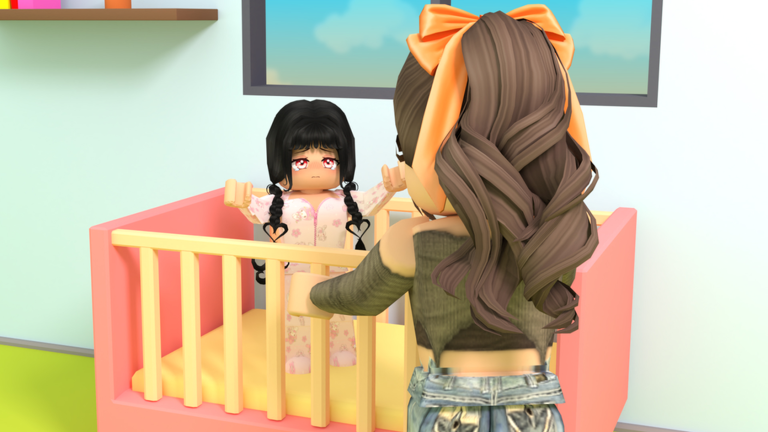
Your first hour in Adopt and Raise
Adopt and Raise (Roblox place 1245865042, universe 506112045) is a free-to-play family roleplay world run by Adopt and Raise Fans. Servers hold up to 50 players. The current place launched December 14, 2017, descending from Tremity’s 2014 Adopt and Raise a Cute Kid and the later Adopt and Raise a Baby branding. This guide is only for that experience—not Adopt Me! and not Raise The Biggest Family.
You will leave the first session with a customized look, a family decision, a house (and ideally the Bought a House badge), and a mental map of town, cars, and the summer beach expansion. For controls specifics, keep Controls & Tips open in another tab.
Step 1 — Open the Avatar Editor
The game greets many new players with a modern Avatar Editor. Treat it as mandatory, not optional fluff:
- Pick a silhouette that matches the role you want today—Parent, Teen, Baby-coded look, or a pet-inspired vibe (full role advice on Players).
- Layer clothing carefully so nameplates and emotes stay readable in crowded doorways.
- Save before you wander. Re-opening the editor later is fine, but a finished look helps strangers accept your RP invites faster.
Avoid spending Robux on impulse outfits before you own a house. Looks matter; bankruptcy before the Bought a House badge does not. For outfit depth, gear-store comedy props, and readable fashion on busy servers, continue in Avatar Editor and Gear Store.
Step 2 — Join a family or create one
After you look the part, decide how you will socialize:
- Join an existing family if you want instant partners for babysitting, carpools, and beach trips. Say hello in chat, ask the household rules, and accept that someone else may already own the plot.
- Create a new family if you arrived with friends or you want to host. Invite patiently—50-player servers are busy, but not everyone wants a new household spam ping.
Families are the social spine of Adopt and Raise. Lone wandering works for sightseeing; long-term fun almost always needs at least one partner. Etiquette for invites lives in Roleplay Tips.
Step 3 — Buy your first house (Bought a House badge)
Spend starter funds on a starter house or basic apartment as soon as you understand the shop UI. The goal is the Bought a House badge and a spawn you control—not an instant luxury flex. Luxury rankings belong later on the Houses & Pets Tier page and in Houses and Cars.
Checklist when you purchase:
- Confirm you actually own the plot (badge toast or inventory/housing confirmation).
- Walk every room once so you know camera corners for future baby RP.
- Place only a few starter furniture pieces—learn move/rotate tools before filling the lobby.
- Set a simple house rule in chat (“knock first,” “shoes off,” “no gear grief”).
If cash feels tight, skip shady money tools. The Scripts Hub explains why executors risk bans. Codes currently list no active promo codes as of late 2026, so plan on organic earnings.
Step 4 — Learn the map loops
Before you adopt, take a quiet lap:
- Town / housing rows — where most family doors face social traffic.
- Gear store — comedy props and hangout toys; buy later unless you need one prop for a skit (see Avatar Editor and Gear Store).
- Car spawns / roads — practice driving without clipping through roleplayers.
- Summer beach expansion — free-area energy, photo spots, and speedboat access called out in the official description (deep dive: Beach and Speedboat).
A single sightseeing lap prevents the classic mistake of adopting a baby and then realizing you do not know where the beach is when the child asks for a trip.
Prefer a video look-around?
For a live session walkthrough with house tours, driving, and a boat ride, open the embedded video on Beach and Speedboat. Pause when you hit the Avatar Editor or housing shop so you can mirror the steps live, then return here for badges and first-session checklists.
Step 5 — Cars, beach, and speedboat energy
Cars turn the map into a story. Drive from your starter home to the beach, park politely, and try the speedboat when available. Beach days are perfect low-pressure RP: no need for a dramatic plot, just sunscreen chat and pet cameos. Bring the family once you have one; solo scouting first is still smart so you can lead later.
For shore routes, boat loops, and photo spots, open Beach and Speedboat. Broader housing and car upgrades still live in Houses and Cars. Pet passengers and trade shows wait in the Pets Guide.
Step 6 — Plan your second session goals
End the first session by writing three goals in chat notes or a phone sticky:
- Adopt carefully using How to Adopt for the Adopted a Baby badge.
- Add one reliable pet companion.
- Schedule a beach or house-tour hangout with clear roles (Beach and Speedboat or Roleplay Tips).
- Tick off Joined, Bought a House, and adoption progress on Badges & Milestones.
Optional fifth goal: browse Updates so you know whether the October 2026-era patch changed shops or beach props.
Common first-session mistakes
- Skipping the Avatar Editor and wondering why invites bounce.
- Saving for luxury while homeless—badge progress stalls.
- Adopting before learning the map, then getting lost mid-care loop.
- Pulling chaotic gear in someone else’s plot on minute ten.
- Trusting “free money script” ads instead of normal play.
Sibling guides to open next
- How to Adopt — parenting loop and adoption badge
- Beach and Speedboat — shore routes and speedboat outings
- Avatar Editor and Gear Store — looks, fashion, and gear comedy
- Houses and Cars — decorating and travel depth
- Pets Guide — collect and trade
- Roleplay Tips — etiquette and hangout recipes
- Badges & Milestones — Joined, house, and adoption checklist
- Guides Hub — full index
You do not need perfect wealth to belong here. You need a look, a door, a little map knowledge, and the willingness to say “want to be family?” in a friendly server. Finish those, and Adopt and Raise opens up.
Frequently Asked Questions
Quick answers to the most common questions.
What should I do first after joining?
Use the Avatar Editor (see Avatar Editor and Gear Store for depth), decide to join or create a family, then buy a starter house for the Bought a House badge before heavy exploring.
Do I need a luxury house on day one?
No. Any first house can unlock Bought a House. Save luxury goals for later once your family and baby care loop are stable.
Where is the beach and speedboat?
They are part of the summer beach expansion. Scout roads by car first, then follow Beach and Speedboat for shore routes and trying the speedboat together.
Are there codes to speed up the first session?
As of late 2026 there are no active promo codes. Focus on the starter house and map lap instead.
What badge can I earn quickly?
Joined comes from playing; Bought a House comes from your first home purchase; Adopted a Baby comes after the adoption guide. Track all three on Badges & Milestones.