Adopt and Raise a Baby Houses and Cars in Adopt and Raise
Starter homes, apartments, decorating, cars, beach travel, and Bought a House.
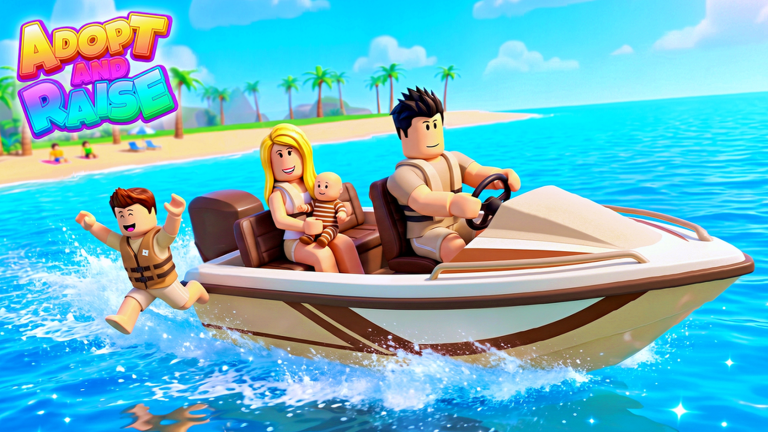
Homes and travel in Adopt and Raise
Adopt and Raise (Roblox place 1245865042, universe 506112045) is a free-to-play family roleplay experience by Adopt and Raise Fans, with 545M+ visits and up to 50 players per server. The current place launched December 14, 2017, descending from Tremity’s 2014 Adopt and Raise a Cute Kid and the later Adopt and Raise a Baby name. Official copy highlights luxury houses, custom cars, the summer beach expansion, and a speedboat—this guide covers how to use those systems without confusing the title with Adopt Me! or Raise The Biggest Family.
If you have not finished Avatar Editor setup or family choice, skim Getting Started first. If you are ready to parent, pair this page with How to Adopt.
Buying your first house (Bought a House badge)
Spend starter funds on a starter house or basic apartment as soon as you understand the housing shop. The goal is ownership and the Bought a House badge—not an instant mansion flex. Luxury comparisons belong on the Houses & Pets Tier page once your family and baby care loop are stable.
First-purchase checklist:
- Confirm ownership (badge toast or housing confirmation).
- Walk every room so you know camera corners for baby and pet RP.
- Place only a few furniture pieces while you learn move/rotate tools.
- Post one house rule in chat (“knock first,” “no gear grief,” “shoes off”).
Cash feels tight for many new players. Codes show no active promo codes as of late 2026, so earn in-world instead of chasing dump tools. The Scripts Hub explains why executors are a bad trade for a foyer upgrade.
Houses, apartments, and plot etiquette
Housing stock mixes street-facing homes and denser apartment-style options depending on map era and shop stock. Treat whichever plot you own as a stage:
- Starter homes — Fast badge path, enough rooms for a nursery corner and living-room hangout.
- Apartments / compact plots — Great for short sessions and quieter care loops when town rows feel crowded.
- Luxury / statement homes — Save these for after you know decorating tools and have a family roster that will actually use the space.
Etiquette that prevents drama in 50-player servers:
- Knock or ask before entering another owned plot.
- Do not block doorways with cars or gear props.
- Keep loud gear-store comedy away from nap scenes unless the household agreed.
- If you sell or switch homes, tell your family so babysitting routes stay valid.
Role boundaries for Parent, Teen, Baby, and Pet players are covered on Players and Roleplay Tips.
Decorating that supports roleplay
Decorating is not only cosmetics—it is stage design:
- Leave a clear path from door to crib or couch so care actions stay readable.
- Add a photo corner near a window for beach-day returns and pet showcases.
- Use soft seating clusters for family meetings instead of filling every tile.
- Recolor carefully so nameplates and emotes stay visible on mobile.
Pets make excellent living-room props and trade flex; collect and trade guidance sits in the Pets Guide. When you outgrow a layout, redesign before buying a second showpiece you will never open.
Cars, roads, and polite driving
Cars turn the map into a story. Spawn or purchase a vehicle when you can, then practice on open roads before ferrying a baby:
- Park beside plots—do not nose into porches.
- Offer rides in chat instead of surprising passengers with sudden boosts.
- Use cars for house-tour hops, gear-store comedy runs, and trips to the summer beach.
- If traffic is messy, walk short distances; immersion beats clipping through roleplayers.
Custom cars are part of the official fantasy alongside homes and pets. Treat driving as shared RP, not a race lobby.
Summer beach expansion and speedboat travel
The official description calls out a summer beach expansion and speedboat. Scout the shore by car first so you can lead later:
- Drive from your plot to the beach area without abandoning household chat.
- Park politely and set a meetup point for co-parents and friends.
- Try the speedboat when available for short water loops and photo beats.
- Return home for nap or decorating so the outing has a beginning and end.
For a dedicated shore-day walkthrough—routes, boat loops, photo spots, and family outing pacing—open Beach and Speedboat. This Houses and Cars page stays focused on plots, decorating, and vehicles that get you there. Beach days are perfect low-pressure RP—sunscreen chat, pet cameos, soft conflict, no need for a soap-opera finale. Hangout recipes live in Roleplay Tips. Patch notes that move props or shop stock appear on Updates.
Upgrading without burning the session
A healthy upgrade path looks like this:
- Starter house → Bought a House badge.
- Nursery or living-room pass that supports How to Adopt care loops.
- Reliable car for town and beach travel (shore depth in Beach and Speedboat).
- One pet display corner from the Pets Guide.
- Optional luxury move guided by the Houses & Pets Tier rankings.
Skip step five until your family actually shows up. An empty S-tier lobby is worse storytelling than a decorated starter with active care.
Common housing and travel mistakes
- Saving for luxury while homeless—badge progress stalls.
- Adopting before knowing where the beach and roads are.
- Filling rooms so densely that baby care animations clip.
- Joyriding through someone else’s plot with gear drawn.
- Trusting “free money for mansion” ads instead of normal play.
Controls, money habits, and UI checklists sit under Controls & Tips. Broader wiki context is on /wiki/. The full walkthrough index is the Guides Hub.
Sibling guides
- Getting Started — day-one Avatar Editor, family, first purchase
- Beach and Speedboat — dedicated shore and speedboat guide
- How to Adopt — adoption flow and Adopted a Baby badge
- Pets Guide — companions for your living room
- Roleplay Tips — etiquette for house tours and beach days
- Houses & Pets Tier — ranking flex when you are ready
Own a door, learn the roads, decorate for people who will actually visit, and treat the beach speedboat as a shared outing. That is how houses and cars turn Adopt and Raise into a lasting neighborhood on Roblox.
Frequently Asked Questions
Quick answers to the most common questions.
How do I get the Bought a House badge?
Purchase your first house or basic apartment with in-game funds. The badge toast confirms ownership—starter plots count; luxury is optional.
Should I buy a luxury house on day one?
No. Unlock Bought a House with a starter home, decorate for care and RP, then consult the Houses & Pets Tier list before spending on statement luxury.
Where do cars and the speedboat fit in?
Cars move families between town plots, shops, and the summer beach. The speedboat is part of the beach expansion—scout by car first, then read Beach and Speedboat for water travel together.
Can codes pay for a better house right now?
As of late 2026 there are no active promo codes. Earn cash in-game and avoid script scams promising free mansions.
Do apartments count the same as houses?
Any first owned plot that completes the purchase flow can unlock Bought a House. Choose the size that fits your session length and family roster.